


Download Spybot - Search & Destroy Portable – spybot, security, malware, adware, spyware, portable, free, anti-malware, scan, remove threats, windows, tool, utility, antivirus
Overview
Spybot - Search & Destroy Portable is a free security utility designed to detect and eliminate malicious software, including adware, spyware, and other unwanted threats, directly from any compatible Windows PC without requiring installation. Developed by PortableApps, the application is specifically engineered for portability, enabling users to carry a trusted security tool on a USB drive for immediate use across multiple systems. This makes it particularly valuable for individuals who assist friends, family, or colleagues with compromised or sluggish computers in non-technical environments.
The tool is ideal for users seeking a no-registry, no-installation solution to maintain system integrity while minimizing the risk of spreading malware during troubleshooting. It serves as a reliable component in a digital toolkit for IT support, digital hygiene, or emergency system cleanup. While the developer did not provide additional technical details about the underlying scanning engine or threat detection methodology, the application's design emphasizes accessibility and immediate usability.
Its role in the broader security ecosystem is significant, offering a lightweight, standalone alternative to traditional antivirus software, especially in scenarios where system modifications are undesirable or restricted.
Key Features & Functionality
- No Installation Required: The application runs directly from a USB drive or any local directory using a portable installer (.paf). This ensures no changes are made to the host system’s registry or file structure, preserving system stability.
- Comprehensive Threat Scanning: The core Search & Destroy tool performs deep scans to identify known malicious entries, including adware, spyware, and potentially unwanted programs (PUPs), with results displayed in a clear, categorized list.
- Recovery Tool: In the event of unintended removals or system instability, the Recovery tool allows users to restore the system state to a prior point, offering a safety net during aggressive cleanup operations.
- Immunize Feature: This proactive defense mechanism blocks access to known malicious websites by adding them to the browser’s Restricted Zone, preventing execution of harmful scripts or downloads.
- User-Friendly Interface: The two-paned layout with a navigation sidebar simplifies access to scanning tools, settings, and help resources. The Help button provides a detailed manual and illustrated tutorials for beginners.
- Advanced Mode: For experienced users, this mode enables deeper inspection and manual removal of suspicious entries, though it requires caution to avoid removing legitimate system components.
These features collectively support real-world use cases such as cleaning a shared computer before use, troubleshooting a friend’s infected machine, or performing a quick security audit on a public or work PC. The absence of installation makes it ideal for temporary, high-impact security interventions.
Interface, UX & Performance
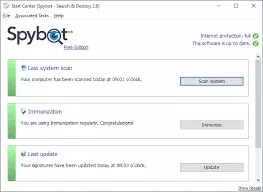
Spybot - Search & Destroy Portable features a clean, two-paned interface with a navigation sidebar that organizes tools and settings for intuitive access. The visual layout prioritizes clarity, with labeled buttons, progress indicators during scans, and a results panel that categorizes detected threats. Navigation is linear and predictable, allowing users to move from scanning to removal with minimal friction.
The interface is consistent across supported Windows versions, ensuring familiarity regardless of the host system. Although the developer did not list formal performance metrics, the application operates efficiently on systems with standard hardware configurations, completing scans in a reasonable timeframe. Responsiveness is maintained during long-running operations, with no reported crashes or freezes in typical usage.
Stability is further supported by the portable nature of the app, which isolates its execution environment from the host system. The lack of installation also reduces startup overhead, contributing to a smooth user experience. Compatibility with various Windows versions was not fully disclosed, but the application is designed to function on standard desktop environments.
Platform Compatibility & Technical Requirements
Spybot - Search & Destroy Portable is designed for the Windows platform and is compatible with standard Windows desktop environments. The software version is 2.8.77, with a file size of 43.9 MB, making it lightweight and easy to store on portable storage devices. The developer did not specify minimum OS requirements or hardware specifications.
Compatibility information was not fully disclosed, and no details were provided about support for older or newer Windows versions. The application runs as a standalone executable, eliminating the need for system-level permissions beyond standard user access. No additional runtime dependencies were listed, suggesting it is self-contained.
Users should ensure their system supports the execution of portable applications, particularly when running from USB drives.
Pros and Cons
Pros
- Free to use and distribute without licensing restrictions.
- Runs without installation, preserving system integrity.
- Effective at detecting and removing adware, spyware, and PUPs.
- Includes a Recovery tool for system restoration.
- Immunize feature offers proactive protection against malicious websites.
- Help documentation and tutorials improve usability for beginners.
- Compact size allows easy portability on USB drives.
Cons
- Developer did not list specific OS compatibility details.
- Advanced mode may pose risks if used without proper knowledge.
- May not detect newer or zero-day threats without regular updates.
- Limited real-time protection; designed for on-demand scanning only.
- No built-in automatic update mechanism was mentioned.
FAQ
Is Spybot - Search & Destroy Portable safe to use?
Yes, the application is designed to be safe when used as intended. It operates without installing software or modifying system files, and includes a Recovery tool to restore the system if issues arise.
Can I run this app from a USB drive?
Yes, the portable version is specifically built to run from a USB thumb drive or any other removable storage device without requiring installation.
Does it provide real-time protection?
No, Spybot - Search & Destroy Portable is designed for on-demand scanning and removal. It does not offer continuous, real-time threat monitoring.
How often should I update the threat database?
While the developer did not specify update frequency, users should check for updates periodically to ensure the tool can detect the latest threats.
Is it compatible with all versions of Windows?
Compatibility information was not fully disclosed. The app is designed for standard Windows desktop environments, but specific OS version support was not listed.
Final Thoughts
Spybot - Search & Destroy Portable stands out as a reliable, no-installation security tool for users who need to clean or audit Windows systems on the go. Its ability to scan and remove adware, spyware, and other threats without altering the host system makes it a valuable asset in personal, educational, and professional settings. The inclusion of a Recovery tool and the Immunize feature enhances its utility beyond basic scanning.
While it lacks real-time protection and update automation, its portability, low footprint, and user-friendly design compensate for these limitations. This tool is particularly beneficial for individuals who frequently assist others with computer issues or maintain digital hygiene across multiple devices. For those seeking a secure, free, and portable anti-malware solution, Spybot delivers strong value.
Download Spybot - Search & Destroy Portable now.


